Introduction
This Proof of Technology (PoT) provides a hands-on experience for those needing to understand how the IBM MQ Salesforce Bridge may be used to support bidirectional integration of IBM MQ and Salesforce. Integration is enabled via the Publish and Subscribe capabilities of IBM MQ and the Platform Event and Push Topic features of Salesforce.
In order to complete this PoT you will need to have access to the Xubuntu 64-bit 14.04 virtual machine image that may be found in the Skytap Environment that your instructor has provided you. You will also need a Salesforce Developer account. Complete the steps described in the Prerequisites and Create Salesforce Developer Account documents if you need to create either of these.
How it Works
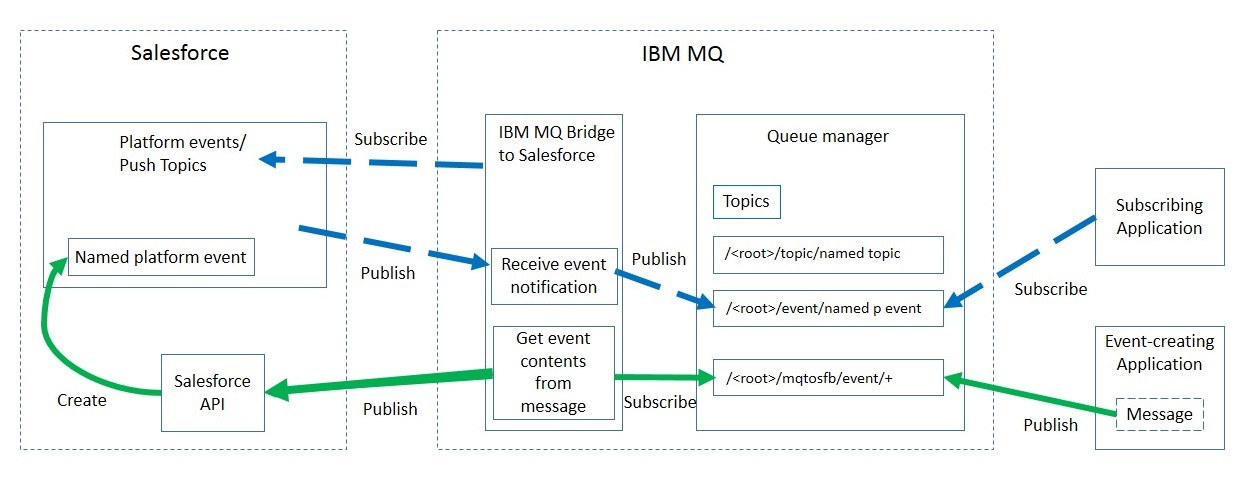
Salesforce is a cloud based, customer relationship management platform. If you are using Salesforce to manage customer data and interactions, beginning from IBM MQ Version 9.0.2 or later you can use the IBM MQ Bridge to Salesforce to subscribe to Salesforce push topics and platform events that can then be published to your IBM MQ queue manager. Applications that connect to that queue manager can then consume the push topic and platform event data.
Push topics are queries that you define to use the Force.com Streaming API to receive notifications for changes to records in Salesforce. For more information on configuring push topics and how to use the Streaming API, see Introducing Streaming API and Working with PushTopics.
Platform events are customizable event messages that can be defined to determine the event data that the Force.com platform produces or consumes. For more information on platform events and the difference between Salesforce events, see Enterprise messaging platform events and What is the difference between the Salesforce events.
You can monitor the data from the bridge in two ways, through the IBM MQ Console and by using the -p parameter with the amqsrua command. One set of data is published for the overall bridge status:
- Total push topic messages that are processed in an interval (under the STATUS/PUSHTOPIC tree).
- Number of push topics that are seen in this interval.
- Total platform events that are processed in an interval (under the STATUS/PLATFORM tree).
- Number of platform events that are seen in this interval.
For each configured Salesforce topic, a further message is published. The IBM MQ topic uses the full Salesforce topic name and the /event or /topic in the object name:
- Number of messages that are processed in an interval.