Overview
This one-day Proof of Technology (PoT) provides a hands-on experience for those needing to understand how IBM® MQ Managed File Transfer can be used to implement a managed file transfer solution. The labs demonstrate a broad spectrum of functionality, allowing students to see how IBM® MQ Managed File Transfer (MFT) is configured and administered.
Introduction
MQ MFT transfers files between systems in a managed and auditable way, regardless of file size or the operating systems used.
You can use MQ MFT to build a customized, scalable, and automated solution that enables you to manage, trust, and secure file transfers. MQ MFT eliminates costly redundancies, lowers maintenance costs, and maximizes your existing IT.
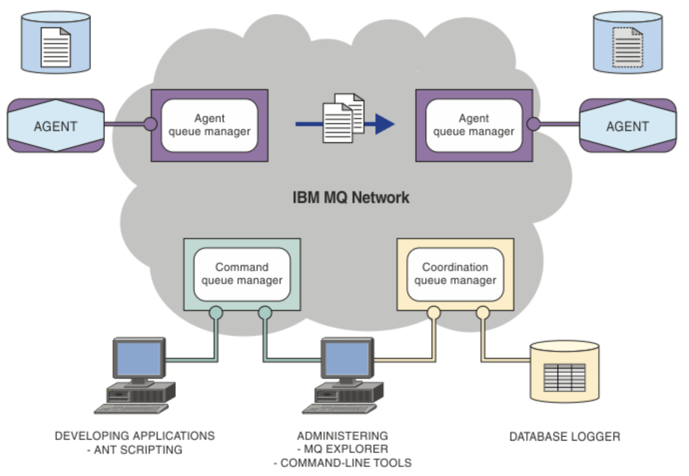
The diagram shows a simple MQ MFT topology. There are two agents, each connect to their own agent queue manager in an MQ network. A file is transferred from the agent on the left side of the diagram, through the MQ network, to the agent on the right side of the diagram. Also in the MQ network are the coordination queue manager and a command queue manager. Applications and tools connect to these queue managers to configure, administer, operate, and log MQ MFT activity in the IBM MQ network.
MQ MFT can be installed as three different options, depending on your operating system and overall setup. These options are MQ Managed File Transfer Server, MQ Managed File Transfer Client, and MQ Managed File Transfer for z/OS®. For information, see MQ MFT product options.
You can use MQ MFT to perform the following tasks:
-
Create managed file transfers
- Create new file transfers from IBM MQ Explorer on Linux or Windows platforms.
- Create new file transfers from the command line on all supported platforms.
- Integrate file transfer function into the Apache Ant tool.
- Write applications that control MQ MFT by putting messages on agent command queues.
- Schedule file transfers to take place at a later time. You can also trigger scheduled file transfers based on a range of file system events, for example a new file being created.
- Continually monitor a resource, for example a directory, and when the contents of that resource meet some predefined condition, start a task. This task can be a file transfer, an Ant script, or a JCL job.
- Use the RESTful API provided by the MQ MFT Web Gateway to transfer files.
- Transfer files to and from IBM MQ queues.
- Transfer files to and from FTP or SFTP servers.
- Transfer files to and from Connect:Direct® nodes.
- Transfer both text and binary files. Text files are automatically converted between the code pages and end-of-line conventions of the source and destination systems.
-
Transfers can be secured, using the industry standards for Secure Socket Layer (SSL) based connections.
-
View transfers in progress and log information about all transfers in your network
- View the status of transfers in progress from IBM MQ Explorer on Linux or Windows platforms.
- Check the status of completed transfers by using the IBM MQ Explorer on Linux or Windows platforms.
- Use the MQ MFT database logger feature to save log messages to a DB2® or Oracle database.
- Use the RESTful API provided by the MQ MFT Web Gateway to see information about all transfers in your network.
MQ MFT is built on IBM MQ, which provides assured, once-only delivery of messages between applications. You can take advantage of various features of IBM MQ. For example, you can use channel compression to compress the data that you send between agents over IBM MQ channels and use SSL channels to secure the data that you send between agents. Files are transferred reliably and can tolerate the failure of the infrastructure over which the file transfer is carried out. If you experience a network outage, the file transfer restarts from where it left off when connectivity is restored.
By consolidating file transfer with your existing IBM MQ network, you can avoid spending the resources required to maintain two separate infrastructures. If you are not already an IBM MQ customer, by creating a IBM MQ network to support MQ MFT you are building the backbone for a future SOA implementation. If you are already a IBM MQ customer, MQ MFT can take advantage of your existing IBM MQ infrastructure including IBM MQ internet pass-thru and IBM Integration Bus.
Managed File Transfer integrates with a number of other IBM products:
-
IBM Integration Bus
Process files that have been transferred by Managed File Transfer as part of an IBM Integration Bus flow. For more information, see Working with MFT from IBM Integration Bus.
-
IBM Sterling Connect:Direct
Transfer files to and from an existing Connect:Direct network by using the Managed File Transfer Connect:Direct bridge. For more information, see The Connect:Direct bridge.
-
IBM Tivoli® Composite Application Manager
IBM Tivoli Composite Application Manager provides an agent that you can use to monitor information that is published to the coordination queue manager.
File Transfer Patterns
MQ MFT includes a number of extensions for Apache Ant which enables you to carry out certain tasks. IBM® MQ File Managed File Transfer provides tasks that you can use to integrate file transfer function into the Apache Ant tool.
IBM® MQ Managed File Transfer provides a number of Ant tasks that you can use to access file transfer capabilities.
- fte:awaitoutcome
- fte:call
- fte:cancel
- fte:filecopy
- fte:filemove
- fte:ignoreoutcome
- fte:ping
- fte:uuid
The following nested parameters describe nested sets of elements, which are common across several of the supplied Ant tasks:
- fte:filespec
- fte:metadata
You can use the fteAnt command to run Ant tasks in a MQ MFT environment that you have already configured. Using Ant scripts with IBM® MQ Managed File Transfer allows you to coordinate complex file transfer operations from an interpreted scripting language.
The fteAnt command runs Ant scripts in an environment that has IBM® MQ Managed File Transfer Ant tasks available. Unlike the standard ant command, fteAnt requires that you define a script file. Ant scripts (or build files) are XML documents defining one or more targets. These targets contain task elements to run.
Examples of Ant scripts that use MQ MFT tasks are provided with your product installation in the directory install_dir/samples/fteAnt.
A namespace is used to differentiate the file transfer Ant tasks from other Ant tasks that might share the same name. You define the namespace in the project tag of your Ant script.
<?xml version="1.0" encoding="UTF-8"?>
<project xmlns:fte="antlib:com.ibm.wmqfte.ant.taskdefs" default="do_ping">
   <target name="do_ping">
      <fte:ping cmdqm="qm@localhost@1414@SYSTEM.DEF.SVRCONN"
      agent="agent1@qm1" rcproperty="ping.rc" timeout="15"/>
   </target>
</project>
The attribute xmlns:fte=”antlib:com.ibm.wmqfte.ant.taskdefs” tells Ant to look for the definitions of tasks prefixed by fte in the library com.ibm.wmqfte.ant.taskdefs.
You do not need to use fte as your namespace prefix; you can use any value. The namespace prefix fte is used in all examples and sample Ant scripts.
To run Ant scripts that contain the file transfer Ant tasks use the fteAnt command. For example:
fteAnt -file ant_script_location/ant_script_name
The file transfer Ant tasks return the same return codes as the MQ MFT commands.
How does MFT work with IBM MQ?
Managed File Transfer interacts in a number of ways with IBM® MQ.
-
Managed File Transfer transfers files between agent processes by dividing each file into one or more messages and transmitting the messages through your IBM MQ network.
-
The agent processes move file data by using nonpersistent messages to minimize the impact on your IBM MQ logs. By communicating with one another the agent processes regulate the flow of messages containing file data. This prevents messages containing file data building up on IBM MQ transmission queues and ensures that if any of the nonpersistent messages are not delivered, the file data is sent again.
-
Managed File Transfer agents use a number of IBM MQ queues. For more information, see MFT system queues and the system topic.
-
Although some of these queues are strictly for internal use, an agent can accept requests in the form of specially formatted command messages sent to a specific queue that the agent reads from. Both the command-line commands and the IBM MQ Explorer plugin send IBM MQ messages to the agent to instruct the agent to perform the wanted action. You can write IBM MQ applications that interact with the agent in this way. For more information, see Controlling MFT by putting messages on the agent command queue.
-
Managed File Transfer agents send information about their state and the progress and outcome of transfers to an MQ queue manager that has been designated as the coordination queue manager. This information is published by the coordination queue manager and can be subscribed to by applications that want to monitor transfer progress or keep records of the transfers that have occurred. Both the command-line commands and the IBM MQ Explorer plug-in can use the information that is published. You can write IBM MQ applications that use this information. For more information about the topic that the information is published to, see SYSTEM.FTE topic.
-
Key components of Managed File Transfer take advantage of the capability of IBM MQ queue managers to store and forward messages. This means that if you suffer an outage, unaffected parts of your infrastructure can continue to transfer files. This extends to the coordination queue manager, where a combination of store and forward and durable subscriptions allow the coordination queue manager to tolerate becoming unavailable without losing key information about the file transfers that have taken place.
MFT Product Options
Managed File Transfer can be installed as four different options, depending on your operating system and overall setup. These options are Managed File Transfer Agent, Managed File Transfer Logger, Managed File Transfer Service, or Managed File Transfer Tools.
MFT Topology Overview
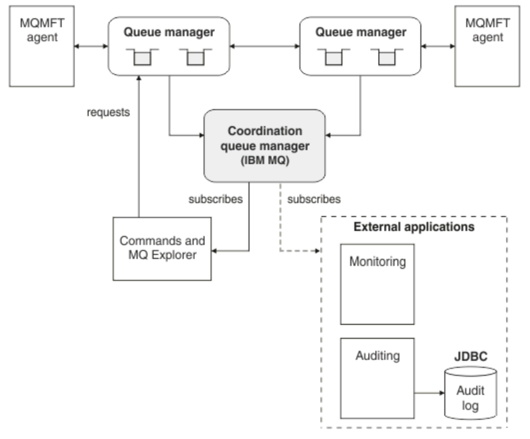
An overview of how Managed File Transfer agents are connected with the coordination queue manager in an IBM® MQ network.
Managed File Transfer agents send and receive the files that are transferred. Each agent has its own set of queues on its associated queue manager and the agent is attached to its queue manager in either bindings or client mode. An agent can also use the coordination queue manager as its queue manager.
The coordination queue manager broadcasts audit and file transfer information. The coordination queue manager represents a single point for the collection of agent, transfer status, and transfer audit information. The coordination queue manager is not required to be available in order for transfers to take place. If the coordination queue manager temporarily becomes unavailable, transfers continue as normal. Audit and status messages are stored in the agent queue managers until the coordination queue manager became available, and can then be processed as normal.
Agents register with the coordination queue manager and publish their details to that queue manager. This agent information is used by the Managed File Transfer plugin to enable the start of transfers from the IBM MQ Explorer. The agent information collected on the coordination queue manager is also used by the commands to display agent information and agent status.
Transfer status and transfer audit information is published on the coordination queue manager. The transfer status and transfer audit information is used by the Managed File Transfer plug-in to monitor the progress of transfers from the IBM MQ Explorer. The transfer audit information stored on the coordination queue manager can be retained to provide auditability.
The command queue manager is used to connect to the IBM MQ network and is the queue manager connected to when you issue Managed File Transfer commands.
MFT REST API Overview
An overview of the REST API enhancements for Managed File Transfer.
From IBM® MQ Version 9.0.5, the REST API adds support for certain Managed File Transfer commands, including listing transfers, and details about file transfer agents.